
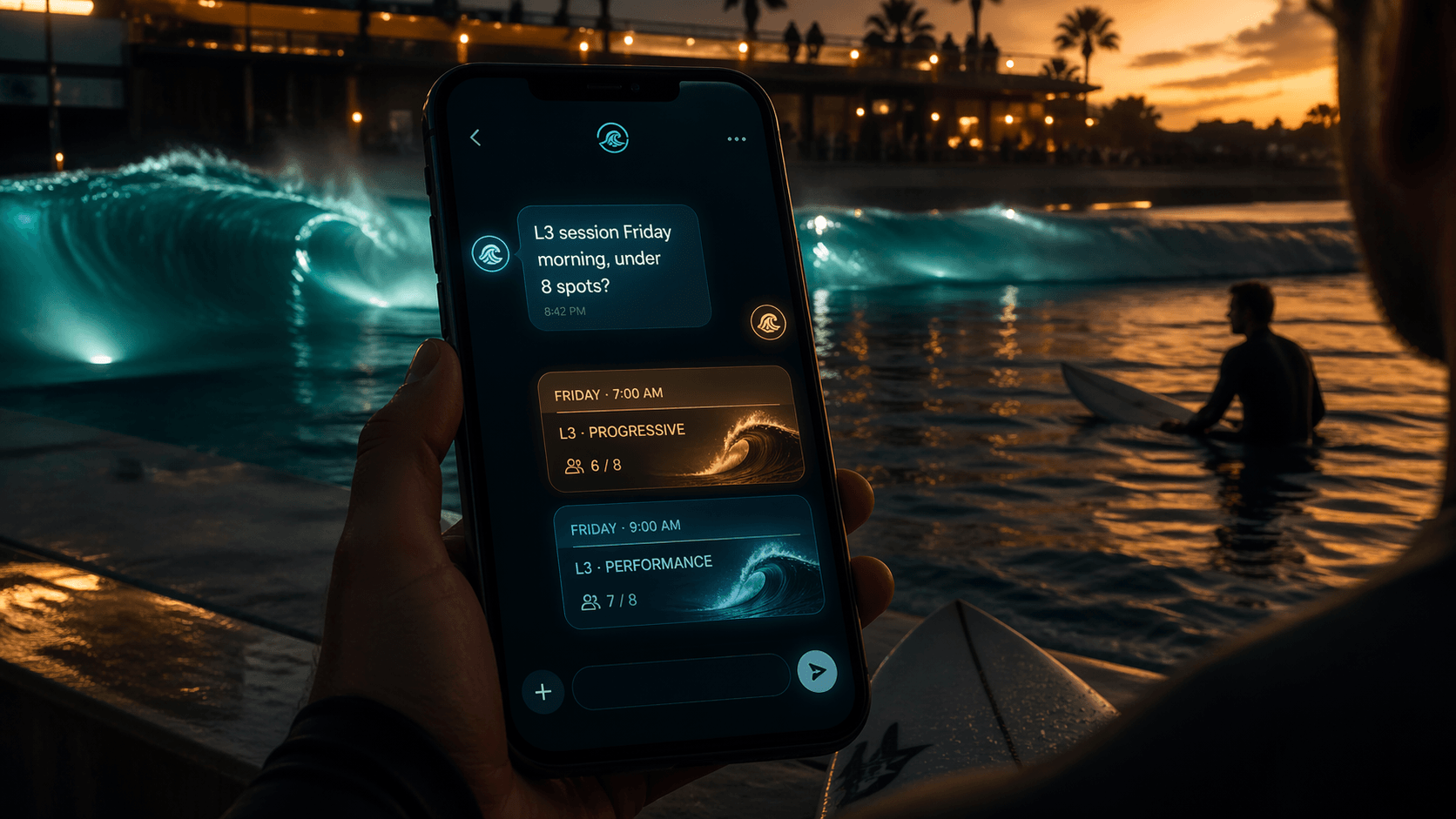
You open the schedule page. There are 40+ sessions staring back at you. Tuesdays, Thursdays, early mornings, late afternoons, beginner waves, barrel waves, left side, right side… you just wanted to know if there’s a low-crowd intermediate slot this Friday morning.
Sound familiar? We fixed that.
Introducing the Live Schedule AI Assistant
Every pool schedule page on Surf Session Finder now has a built-in AI chatbot. It knows the live schedule for your park - every session, every time slot, every available spot - and it answers in plain language.
You type: “L3 session with under 6 people this weekend” It replies: here are the matching sessions, with dates, times, spots left, and a direct link to book.
No filtering. No scrolling. No guessing. Just ask.
What It Actually Does
The assistant reads the real-time schedule the moment you open the page - not a cached snapshot, the actual live data. When you describe what you’re looking for, it matches your request against every available session and returns only the ones that fit.
It shows you:
- Date and time of each matching session
- Session title and wave side (where applicable)
- Spots available - highlighted amber when it’s getting tight
- A direct booking link so you can lock it in immediately
If more than four sessions match, it shows the first four and lets you expand the rest with one click.
It Actually Talks Like a Surfer
The assistant isn’t a corporate FAQ bot. It’s set up to sound like an enthusiastic grom who lives at the park - short, stoked, and straight to the point. It’ll say “sick, there’s a perfect L4 slot Thursday morning with 8 spots - go grab it” rather than generating a three-paragraph policy response.
It asks one quick clarifying question if it needs more info, then gets out of the way.
What Happens When Nothing Matches
No sessions match your filters? The assistant won’t hallucinate results or return sessions that don’t fit. Instead it tells you honestly - nothing right now - and suggests which condition you could relax (different day, different level, more spots) to open things up.
It also flags the Surf Session Finder alert service: set your preferences once and get pinged the instant a matching slot opens, including cancellations that pop up minutes before a session starts.
Available at Every Pool, in Every Language
The AI assistant is live on all ten surf park schedule pages:
| Park | Country |
|---|---|
| URBNSURF Melbourne | Australia |
| URBNSURF Sydney | Australia |
| The Wave Bristol | UK |
| Lost Shore Edinburgh | UK |
| Atlantic Park Virginia | USA |
| Skudin Surf New Jersey | USA |
| Waco Surf Texas | USA |
| Surfland Brasil | Brazil |
| SRF Park Tel Aviv | Israel |
| Alaïa Bay Sion | Switzerland |
It responds in the language of your browser. Hebrew at SRF Park TLV, Portuguese at Surfland Brasil, English everywhere else - automatically.
How to Use It
- Go to your park’s schedule page on Surf Session Finder
- Type what you’re looking for in the chat box (level, day, crowd preference - whatever matters to you)
- The assistant returns the matching sessions from the live schedule
- See a session you like? Hit the booking link and you’re done
That’s it. No account required, no settings to configure - it’s just there, ready to go.
Pro Tip: Combine It With Alerts
After the assistant finds your sessions, it’ll offer to set you up with alerts for that same preference - so the next time a matching slot opens (including last-minute cancellations), you get notified instantly without having to check the schedule again.
It’s the fastest way to go from “I want to surf Thursday” to having an actual session on the books.
Try it now - head to your park’s schedule page and just ask. The session you’re looking for is probably already there.
Published by SurfSessionFinder - Free tools to help surfers find and book sessions at wave pools worldwide.